Determine your technical debt using SonarQube - Conclusion

Oct 6, 2017 1 min.

Installing and setting up SonarQube may seem quite complex and tedious.

I hope that this series has helped you to go faster implementing it.

Now, you can clearly identify your technical debt and take actions to improve the quality of your developments.

It is obvious that when a thousand problems appear in the code at once, it can be discouraging, just keep this in mind:

  • There are false positives, make a first pass to ignore/exclude those
Read full article

Determine your technical debt using SonarQube - Bonus SonarLint extension configuration

Oct 4, 2017 2 min.

TL; DR

You can display SonarQube static analysis results live in Visual Studio error and information console using the same rules set as the SonarQube project.

Installing the extension

Just go to https://www.sonarlint.org/VisualStudio/index.html and proceed with the installation.

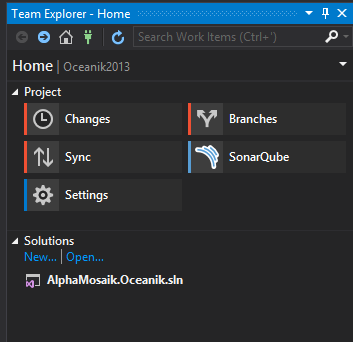
Binding the Visual Studio solution to the SonarQube analysis

19.png

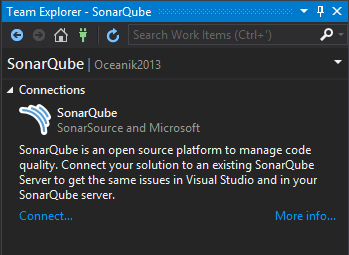
From the Team Explorer click SonarQube

20.png

Click on connect.

(if you obtain a certificate error, you must install the self-signed certificate of the SonarQube server on your machine)

Read full article

Determine your technical debt using SonarQube - Monitoring the results

Oct 2, 2017 1 min.

TL; DR

Static analysis errors will appear as of the warnings in the compilation section. A static analysis badge will also appear on the build report and you’ll be able to have detailed and comprehensive information from SonarQube.

Information incorporated with the build

When displaying the details of a build, you’ll now find a new section dedicated to SonarQube. Within that section, besides the quality badge, you’ll also find a link to the static analysis results details. Also under the build section, all static analysis critical issues will show up as warnings.

Read full article

Determine your technical debt using SonarQube - Creating the SonarQube project

Sep 29, 2017 1 min.

TL; DR

SonarQube allows you to create projects. These projects will hold your code analysis results. You can configure a SQ project for each code repository or even for each branch to have different deltas. (ex my master builds every month, I want to see changes to the monthly and my dev builds daily so I want to see evolution on a day by day basis).

Creating the project

Go to “configuration”-> “Projects”-> “Management” then “create project”.

Read full article

Determine your technical debt using SonarQube - Updating your build definitions

Sep 29, 2017 2 min.

TL; DR

Static analysis will be executed when building your source base using the central build machine. You have two options to set this up with VSTS:

  • Your project is “Visual Studio" related and leverages sln and cs/vb proj files: in that case you can leverage integrated pre and post build tasks provided by the SonarQube VSTS extension.
  • Your project is not build using msbuild: in that case you must leverage the SonarQube CLI task. It’s a little bit more complicated so I’ll demonstrate only the first case for now.

Adding tasks to the build definition

We’ll go under the assumption that you’re already using build 2015/vNext and you have working with build definitions for at least one project.

Read full article

Determine your technical debt using SonarQube - Creating and configuring a service account for VSTS in SonarQube

Sep 27, 2017 1 min.

TL; DR

To prevent anyone from sending analysis results to our SonarQube installation, we need to secure the access to its services. To do so, we’ll configure a service account.

Creating the service account

From SonarQube, go to administration, security, users, and add an account.

Next click on the “tokens" cell for the account we just created an generate a new personal access token.

You can also refer to that documentation if you’re not sure how to generate a PAT https://docs.SonarQube.org/display/SONAR/User+Token

Read full article

Determine your technical debt using SonarQube - Setting up Azure Active directory for authentication

Sep 25, 2017 1 min.

TL; DR

We will install and configure an add-on to delegate authentication to Azure Active Directory. This will allow our developers to use the same account between Visual Studio Team Services and SonarQube.

Configuration of the authentication module

Since version 5.4 SonarQube provides an additional plugin relying on the OAuth protocol to communicate with AAD. This will allow the users to leverage their corporate account to access SonarQube, providing SSO and simplifying the administrators job by having a central identity repository.

Read full article

Determine your technical debt using SonarQube - Adding modules

Sep 22, 2017 1 min.

TL; DR

Static analysis works by leveraging rules. These rules are grouped by language or language categories in modules that you can install. In addition to providing support for the subsequent languages, these modules can extend the native capabilities of SonarQube.

Most of them are free, some are subject to commercial licenses.

Installing Add-ons

Open SonarQube and go to configuration, system, search for and install the modules that you’re interested in.

Read full article

Determine your technical debt using SonarQube - Opening SonarQube’s ports

Sep 20, 2017 1 min.

TL; DR

Open ports 22, 9000, 80 and 443 inbound on the VM.

Details of the opening of ports

Rather than repeating what is already documented, I will provide you with the link

https://Github.com/baywet/azure-docker-SonarQube#step-2-opening-firewall-ports

It is necessary to open the ports 22, 80, 443 and 9000 allowing respectively to access the machine remote shell, load http and https content, and access the management console.

Read full article

Determine your technical debt using SonarQube - Installing the machine

Sep 18, 2017 1 min.

TL; DR

We will update the machine, install docker, and provision the containers we need.

Installation of docker and updating the machine

Connect to the machine using SSH (Putty is a very good client for windows) and run the following commands:

https://Github.com/baywet/azure-docker-SonarQube#step-4-Setup-docker

Setting up containers, creating the certificates

The containers are the components of our system managing the web traffic and providing the SonarQube service.

To secure connections, we will also generate self-signed SSL certificates which is not the easiest thing to do when someone is not used to working with linux environments. It’s most likely to be the case for developers using Visual Studio Team Services (or TFS) because they come mostly from the Windows world.

Read full article